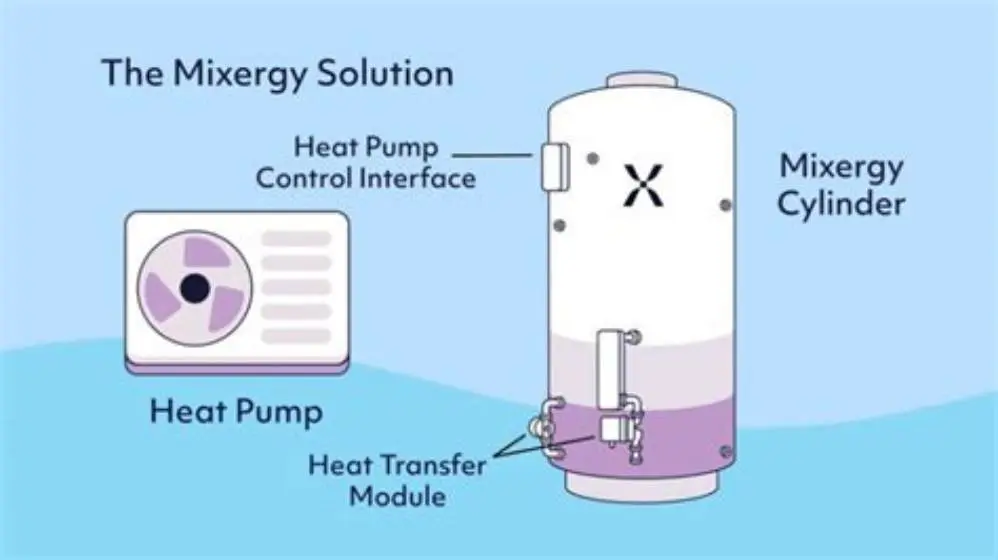
A Mixergy smart cylinder can reheat at different speeds after use, depending on the model, litres drawn, starting temperature, heat pump output, flow temperature, and heat losses. Mixergy does not publish one universal reheat time for every cylinder and heat pump combination. Check your model manual and measure your own cycle before judging performance.
On this page
- Quick recap
- Why a Mixergy smart cylinder is slow to reheat after use
- Check your model and the operating mode
- Run a repeatable reheat test
- Check the top sensor and app data
- Check heat pump flow and return temperatures
- Use an immersion test only with electrical help
- Check the app data and firmware safely
- Check common installation and heat-loss causes
- Calculate the energy used for your own cylinder
- Quick questions
Part of our guide on thermal store tanks with hybrid heat pumps
Quick facts
- Reheat time
- Model and system dependent; no universal figure
- Cylinder models
- Check whether yours is 140L, 210L, 300L, or another model
- Heat pump setting
- Use the installer or heat pump manufacturer’s hot-water guidance
- Useful app data
- Top, middle, and bottom temperatures, target, heating state, and available litres
- Energy calculation
- E = mass × specific heat capacity × temperature rise ÷ efficiency
- Safety
- Use a qualified professional for live electrical tests or cylinder repairs
Quick recap
- Check the cylinder capacity and operating mode before comparing reheat times. A 140L, 210L, and 300L cylinder will not behave alike.
- Record litres drawn, starting and ending temperatures, heat pump power, flow temperature, return temperature, and outdoor conditions.
- Use the Mixergy app graph to compare the top-layer temperature with the target. Do not treat the displayed available litres as a measured volume.
- Higher draw volumes, lower flow temperatures, lower heat pump output, and colder outdoor conditions increase reheat time.
- Do not open the cylinder casing or measure live electrical current unless you are a qualified electrician.
Why a Mixergy smart cylinder is slow to reheat after use
A Mixergy smart cylinder may be slow to reheat after use because the heat pump is delivering less heat than expected. The result also depends on how many litres you used and how hot the remaining water was.
Higher draw volumes leave more cold water to heat. Lower heat pump flow temperatures reduce the temperature difference available at the coil. Cold outdoor conditions, defrost cycles, restricted flow, and competing heating demand can add more delay.
Do not use a general time window as a pass or fail test. Compare the same cylinder, draw volume, starting temperature, flow temperature, and heat source each time. That gives you a useful baseline.
Check your model and the operating mode
A 140L cylinder stores less water than a 210L or 300L model, so an identical draw represents a different share of the tank. The heat pump, coil size, control settings, and available hot-water volume also vary between installations. The other half of this decision is factors limiting geothermal adoption.
Confirm the model and capacity from the cylinder label, installation paperwork, or Mixergy app. Check whether the system is using normal heat-pump heating, immersion backup, or a scheduled heating mode.
Mixergy documentation should take priority over general advice. Read the user guide and installation manual for your exact model, then ask Mixergy or the installer to confirm any unclear operating limits.
- Record the model, nominal capacity, cylinder target, and heating mode.
- Note whether the app reports top-layer temperature or estimated available litres.
- Check the coil, pipework, and heat-pump requirements in the model-specific installation manual.
Run a repeatable reheat test
Use a controlled test instead of a guessed household baseline. Record the indoor temperature, outdoor temperature, cylinder capacity, and the cylinder temperature before drawing water. The other half of this decision is wood pellet boiler heat pump cylinder setup.
Draw a measured volume, not an app estimate. A flow meter gives the best result. If you lack one, collect the water in containers with known capacity and record the total litres. Keep the tap flow and outlet temperature as consistent as possible.
Record the heat pump’s electrical or thermal output if the manufacturer’s app provides it. Also record flow and return temperatures during the hot-water call. State whether the time ends when the top sensor reaches its target or when the controller ends the whole cycle.
Repeat the test under similar conditions. A result without starting temperature, ending temperature, litres drawn, heat pump output, flow temperature, and ambient temperature cannot support a reliable comparison. We cover urban home heat pump noise in its own article.
- Note the model, capacity, indoor temperature, outdoor temperature, and cylinder temperatures.
- Record the start time and available litres shown in the app.
- Draw a measured volume at a recorded outlet temperature.
- Start the heat-pump hot-water call and record flow, return, and heat-source output.
- Stop timing when the chosen top-sensor target is reached, then save the app graph.
- Repeat once under similar conditions and compare both results.

INNTURT HVAC Clamp-On Temperature Probe
Records pipe surface temperatures across -50°C to 150°C with ±0.3°C accuracy so you can capture the heat-pump flow and return temperatures precisely.
Check the top sensor and app data
A stratified cylinder stores hotter water near the top and cooler water lower down. This arrangement is typical of stratified cylinders and may describe how a Mixergy system works, but confirm the detail in your model manual rather than assuming the internal layout.
The app’s available-litre figure is an estimate based on sensor readings and the control model. It is not the same as a flow-meter measurement. Compare the top sensor with the target and watch whether its temperature changes during a heating call.
A sensor reading significantly lower than the actual top-layer temperature can make the controller run longer. A falsely high reading can end the cycle early and leave you with less usable hot water. These are general control effects, not a confirmed Mixergy sensor tolerance. If that sounds like your situation, read up on how to check your own numbers next.
Leave sensor diagnosis and replacement to Mixergy support or an engineer. Do not remove probes, open the casing, or alter wiring.
- Save the top, middle, and bottom readings before and during a reheat.
- Check whether a reading changes during a known heating cycle.
- Compare app readings with a safe, external temperature measurement only where the manual allows it.
- Ask Mixergy support to confirm the sensor specification and recommended fault checks.
Check heat pump flow and return temperatures
Heat pump flow temperature affects reheat speed, but it is only one part of the calculation. Heat pump power, coil transfer, return temperature, water temperature, pipe losses, and control cycling also matter.
Use the hot-water setting recommended by the heat pump manufacturer and cylinder installer. A higher flow temperature can shorten reheat, but it usually reduces heat pump efficiency. A lower setting can improve efficiency while taking longer. Do not change the setting without checking the manuals. People in this spot often ask about testing for voltage drops as well.
Read flow and return temperatures from the heat pump display or approved sensors. Surface measurements can be inaccurate on insulated or poorly contacted pipes. A qualified installer can check flow rate and temperature at the cylinder connections.
A flow-to-return difference is system dependent. Do not treat one fixed delta-T as proof of good or bad operation. Compare the result with the coil and heat-pump manufacturer’s expected range.
| Factor | Effect on reheat | How to check |
|---|---|---|
| More litres drawn | More energy is required | Measure the draw volume |
| Higher flow temperature | Usually increases heat transfer and shortens reheat | Read the hot-water flow temperature |
| Higher heat pump output | Usually supplies energy faster | Check the manufacturer’s app or installer data |
| Lower outdoor temperature | Can reduce output or trigger defrost | Record outdoor conditions |
| Heat loss or poor insulation | Adds energy demand | Ask an installer to inspect pipework and insulation |
Use an immersion test only with electrical help
The immersion can help separate a heat-source problem from a cylinder-control problem. Test it only if the Mixergy manual permits user operation and the immersion circuit is safely accessible.
A 3 kW element at 240 V has a nominal current of 3,000 ÷ 240, or about 12.5 A. Actual current can vary with supply voltage, element rating, temperature, and electrical faults. Current below the nominal figure does not prove the element has partially failed.
A simple energy estimate uses E = P × t. For water heating, use E = mass × 4.186 kJ/kg°C × temperature rise, then divide by the estimated efficiency. For example, 100 kg of water raised by 30°C needs about 12,558 kJ, or 3.49 kWh, before losses. A 3 kW element would need at least 1.16 hours under ideal conditions.
Do not place a clamp meter around live conductors unless you are trained and authorised to do so. Do not remove covers or reset a thermal cutout unless the manufacturer and electrical rules allow it. Ask a qualified electrician to test current, continuity, earthing, and the protective device.
- Check the Mixergy manual for an approved immersion-only mode.
- Record the starting temperature, measured draw volume, and target temperature.
- Time the cycle without opening the electrical enclosure.
- Compare the energy estimate with the electrician’s measured result.
- Stop the test if the breaker trips, wiring smells hot, or the element makes unusual noise.
Check the app data and firmware safely
Use the Mixergy app to record the heating state, target temperature, sensor readings, available litres, and temperature graph. Capture the screen before, during, and after the test.
If the app offers an export function, save the original file without editing it. Record the file format, such as CSV or PDF, the sampling interval, and the date and time zone. If no export exists, take screenshots at a fixed interval and keep the original images.
Do not assume a particular firmware version is outdated. Mixergy release information and support guidance can change. Check for an available update in the app, then ask Mixergy support to confirm the current version for your controller and cylinder.
Send support the model, serial number, app version, controller firmware version, test conditions, screenshots, and exported data. Remove personal information before sharing files publicly.
- Use the app’s export option if available and keep the original file.
- Record the sampling interval and whether readings are instantaneous or averaged.
- Check for updates through the official app or support channel.
- Ask Mixergy to confirm version compatibility before installing or changing firmware.
Check common installation and heat-loss causes
Restricted flow, air in the coil circuit, incorrect pipe connections, closed valves, and competing space-heating demand can all reduce heat delivered to the cylinder. These checks need an installer when they involve sealed circuits or pipework.
Poor insulation increases heat loss between the heat source and cylinder. Scale can affect components in hard-water areas, but do not claim a blocked baffle or damaged diffuser without an inspection and model-specific evidence.
A sudden change points to a control, sensor, pump, valve, or electrical issue. A gradual change can also reflect colder weather, altered schedules, lower flow settings, or changes in household demand.
Ask the installer to compare current readings with commissioning records. The wiring diagram and cylinder connection diagram in the Mixergy installation manual should guide any plumbing check.
- Confirm valves are open and the circulation pump operates during a hot-water call.
- Check for air, leaks, unusual noise, and damaged insulation.
- Compare current flow and return readings with the commissioning record.
- Ask Mixergy or the installer before flushing, opening, or modifying the cylinder.
Calculate the energy used for your own cylinder
The water-heating calculation helps you compare the app with measured conditions. Use E = m × cp × ΔT ÷ efficiency, where m is water mass in kilograms, cp is 4.186 kJ/kg°C, and ΔT is the temperature rise.
For a measured 120 litres rising by 35°C, the ideal water energy is 120 × 4.186 × 35 = 17,582 kJ, or about 4.88 kWh. Divide by the estimated system efficiency to allow for losses. A heat pump’s electrical use also depends on its coefficient of performance, so water energy is not the same as electricity consumed.
Use the app’s energy figure as a comparison, not proof. Check whether it reports electrical input, estimated heat delivered, or a modelled value. Verify unusual results with a qualified installer and an appropriate energy meter.
The calculation needs the actual litres, start temperature, end temperature, losses, heat pump output, and efficiency. A generic kWh or time range cannot replace those measurements.
| Item | Record |
|---|---|
| Cylinder | Model and nominal capacity |
| Water draw | Measured litres and outlet temperature |
| Temperature | Start, target, and end readings |
| Heat source | Heat pump output and heating mode |
| Pipework | Flow and return temperatures |
| Conditions | Indoor and outdoor temperatures |
| App data | Graph, sampling interval, and exported file format |
Quick questions
How long should a Mixergy cylinder take to reheat after use?
There is no single reliable time for every Mixergy model. Capacity, litres drawn, starting temperature, heat pump output, flow temperature, outdoor conditions, coil transfer, and losses all affect the result. Run a controlled test and compare it with your model manual or installer record.
Can I speed up Mixergy reheat by raising the heat pump flow temperature?
A higher hot-water flow temperature usually supplies heat faster, but it can reduce heat pump efficiency. Use the setting recommended by the heat pump manufacturer and Mixergy installer. Ask for confirmation before changing it.
Why does the Mixergy app show hot water available when the tap runs tepid?
The available-litre figure is an estimate based on sensor readings and the control model. Compare the app graph with a measured draw and actual outlet temperature. Send the data to Mixergy support if the estimate remains inaccurate.
Does a Mixergy cylinder reheat more slowly in winter?
It can. Cold outdoor conditions may reduce heat pump output or trigger defrost cycles. Record outdoor temperature and flow temperature before calling it a cylinder fault.
Should I replace the Mixergy controller if reheat slows down?
Not without diagnosis. Check settings, app data, sensors, heat-pump output, flow, and installation records first. Ask Mixergy support to review the controller diagnostics and confirm any firmware advice.
Can I test the immersion with a clamp meter?
Only a qualified person should measure current on live electrical conductors. A 3 kW element at 240 V has a nominal current of about 12.5 A, but measured current depends on supply and equipment condition. Do not remove covers or dismantle the cylinder yourself.