Use the Lifebreath fan control panel by selecting modes like off, low, medium, or high, adjusting airflow for balanced ventilation and heat recovery. Monitor error codes such as 8 and follow basic troubleshooting to keep it running efficiently.
On this page
- Quick recap
- How to use the fan control panel
- Interpreting common error codes like error 8 and what to do
- Adjusting settings for airflow and heat recovery
- Basic troubleshooting steps for Lifebreath ventilation fans
- How to use Lifebreath ventilation fan controls effectively to optimize indoor air quality
- When and why you may need to replace Lifebreath fan parts
- Quick questions
Part of our guide on how mvhr units function
Quick facts
- Fan speeds
- Off to High
- Common error code
- Error 8
- Airflow range
- 30-120 cfm
- Filter cleaning
- Every 6 months
- Heat recovery
- Adjustable
Quick recap
- Set the fan speed to balance airflow and energy use.
- Recognize and respond to error codes like error 8 promptly.
- Adjust heat recovery settings to maintain indoor air quality.
- Regularly clean filters and check for blockages to prevent faults.
- Use the control panel menus to customize operation to your home's needs.
How to use the fan control panel
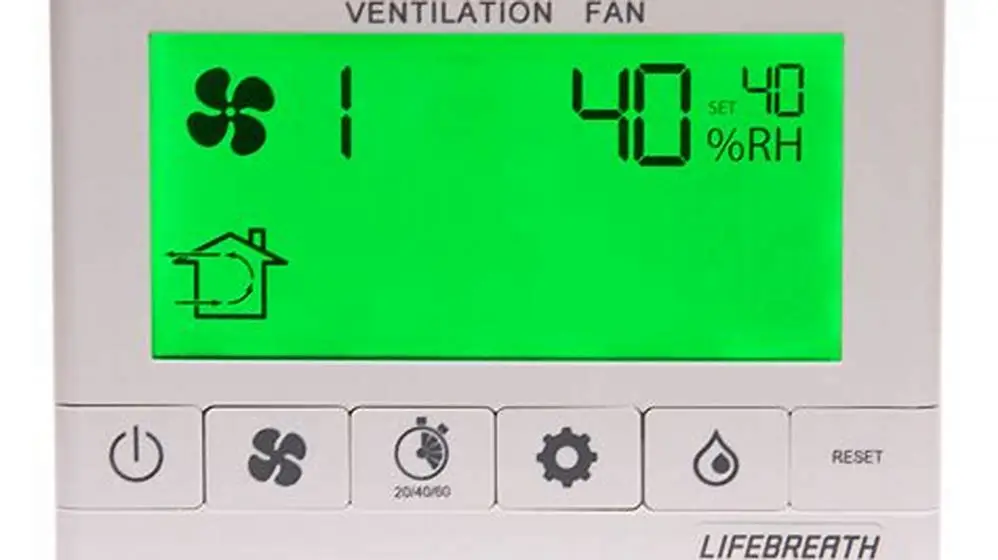
The Lifebreath ventilation fan control panel typically offers settings ranging from off, low, medium, to high fan speeds. These correspond to airflow rates usually between 30 to 120 cubic feet per minute (cfm), depending on the model and house size. Higher settings increase ventilation but also energy use.
The panel uses buttons or a touchscreen to cycle through modes, with indicator lights or a display confirming the current setting. Some models include a timer or humidity sensor mode that adjusts fan operation automatically based on indoor conditions.
To operate the panel, press the power or mode button to turn the fan on. Then select your desired speed. For daily use, medium speed balances energy efficiency and indoor air quality in typical airtight homes.
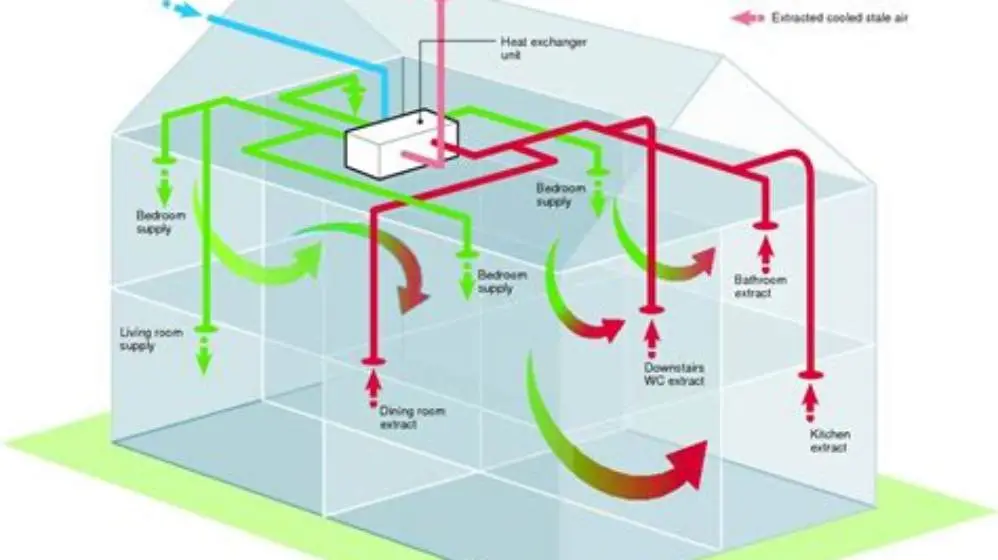
If your home has a heat recovery ventilator (HRV) integrated, the panel may allow adjusting recovery modes to optimize heat transfer between outgoing and incoming air, improving energy savings. We go through maintaining airflow with filters step by step elsewhere on the site.
- Off mode: stops ventilation.
- Low speed: minimal airflow, energy-saving.
- Medium speed: balanced ventilation and energy use.
- High speed: maximum airflow for rapid air exchange.
Interpreting common error codes like error 8 and what to do
Error codes on the Lifebreath fan control panel signal operational issues requiring attention. The most common one is error 8, indicating a blockage or restricted airflow in the system.
When error 8 appears, the fan usually stops or runs at reduced speed to prevent damage. Check filters for dust buildup, clean them if clogged, and inspect intake or exhaust vents for obstructions or closed dampers.
Other less frequent codes may point to electrical faults or sensor problems. Refer to your model's manual for exact meanings, but the first step is always to power cycle the unit by turning it off for a few minutes, then restarting. Before you commit to anything, it is worth looking at how to improve indoor air quality.
If the error persists after cleaning and inspection, call a qualified technician to test the fan motor and control board.
- Error 8: airflow blockage or dirty filter.
- Power cycle: turn fan off for 3 minutes, then back on.
- Clear vents and confirm dampers are open.
- Contact professional if errors persist.

AstroAI Digital Multimeter Tester 2000 Counts with DC AC Voltmeter and Ohm
Diagnoses electrical faults with voltage and continuity measurement functions clearly stated.
Adjusting settings for airflow and heat recovery
Adjust airflow by selecting the fan speed on the control panel. Fan speeds typically correspond to airflow rates from 30 cfm (low) up to 120 cfm (high). Your target airflow depends on your home's size, number of occupants, and airtightness level.
For heat recovery, Lifebreath fans integrate cores that transfer heat between outgoing stale air and incoming fresh air. The control panel lets you select recovery modes that maximize energy savings or boost ventilation during peak humidity or pollutant events. We go through common causes of fan steam failure step by step elsewhere on the site.
Use lower heat recovery settings during mild weather to save energy and increase them when outdoor temperatures are extreme. This balance maintains indoor air quality without excessive heating or cooling costs.
If your fan supports it, set the defrost mode for cold climates to prevent frost buildup on the heat exchange core, which can reduce efficiency and airflow.
- Low speed = 30-50 cfm airflow.
- Medium speed = 60-90 cfm airflow.
- High speed = 100-120 cfm airflow.
- Heat recovery mode adjusts core efficiency and defrost cycle.
Basic troubleshooting steps for Lifebreath ventilation fans
If your Lifebreath fan is not operating correctly, start by confirming it has power and the control panel is responsive. Check circuit breakers if the panel remains off. The other half of this decision is boost speed noise in whole house fan.
Next, inspect and clean or replace filters every 6 months or when visibly dirty. Dirty filters reduce airflow, cause error codes, and can impair heat recovery efficiency.
Ensure intake and exhaust vents are unobstructed by debris, furniture, or closed dampers. Blocked vents restrict airflow and trigger alarms.
Reset the unit by turning off power for 3 to 5 minutes, then powering back on. This often clears minor faults or sensor glitches. We cover how long should each ventilation last in its own article.
If noise levels increase or airflow seems weak after cleaning and resetting, the fan motor or control board may need professional servicing.
- Check power supply and circuit breakers.
- Clean or replace filters.
- Remove obstructions from vents.
- Power cycle the fan.
- Call technician if problems persist.
How to use Lifebreath ventilation fan controls effectively to optimize indoor air quality
Using Lifebreath ventilation fan controls effectively means balancing ventilation needs with energy conservation. Set the fan to medium speed during normal occupancy to provide steady fresh air while recovering heat efficiently.
Boost the fan speed to high temporarily during activities that generate moisture or pollutants, like cooking or showering, to quickly remove contaminants.
Use available timers or humidity sensors to automate fan operation based on occupancy or indoor moisture levels for convenience and energy savings.
Regularly review and adjust settings seasonally. Lower ventilation and heat recovery levels are suitable in mild weather, while higher settings help manage indoor air quality and comfort in extreme temperatures.
- Medium speed for daily use balances efficiency and air quality.
- High speed for short bursts during moisture or pollutant spikes.
- Use timer/humidity modes to automate fan operation.
- Adjust seasonally for best comfort and energy use.
When and why you may need to replace Lifebreath fan parts
Lifebreath ventilation fans are designed for longevity but certain parts wear out or fail, requiring replacement to maintain performance. Filters need replacing or cleaning every 6 months; failing to do so causes airflow restrictions.
Motors may fail after 10+ years due to wear or overheating. If the fan becomes noisy, vibrates, or won’t start despite troubleshooting, the motor or fan blade may need replacement.
Control boards and sensors may also malfunction, particularly if error codes persist after resets and inspections. Replacement parts should meet the manufacturer’s specifications for voltage, size, and compatibility.
Use a digital multimeter to check electrical continuity and voltage when diagnosing control board or motor issues, helping determine if a replacement is necessary.
- Filters: replace or clean every 6 months.
- Motors: consider replacement after 10 years or on failure.
- Control boards: replace if error codes persist after cleaning and resets.
- Use a multimeter to verify electrical faults.
Quick questions
What does error 8 mean on a Lifebreath ventilation fan?
Error 8 usually signals restricted airflow due to dirty filters or blocked vents. Clean filters, check vents, and reset the fan. If the error remains, call a professional.
How often should I clean Lifebreath fan filters?
Filters should be cleaned or replaced every 6 months to maintain airflow and prevent error codes.
Can I adjust the heat recovery settings on my Lifebreath fan?
Yes, most models allow heat recovery adjustment via the control panel to optimize energy savings depending on outdoor temperature.
What if the fan control panel is unresponsive?
Check power supply and circuit breakers, then power cycle the fan. Persistent issues likely need professional repair.
Is it okay to run the fan on high speed continuously?
Running on high speed continuously wastes energy and can reduce fan lifespan. Use high speed only for short periods when needed.