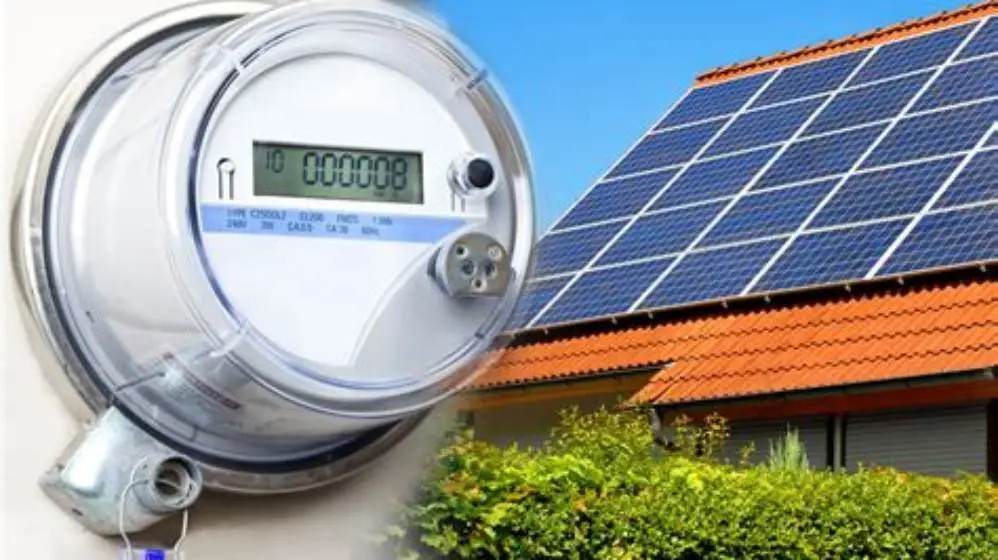
A generation meter is a small MID-approved kWh meter wired after your inverter that counts every unit your solar panels generate, typically to 0.1 kWh. Your smart meter cannot do this job because it only sees import and export at the grid boundary.
On this page
- Quick recap
- What is a generation meter for solar panels?
- Where the generation meter sits and what it measures
- Generation meter vs smart meter vs export meter: what each counts
- Check your generation meter reading and keep records
- Pick the fix when your generation meter stops or looks wrong
- Do you still need a generation meter on new solar installs?
- Get quotes that compare like for like
- Quick questions
Part of our guide on blackout use with solar battery
Quick facts
- What it counts
- Total AC kWh from inverter
- Display step
- Usually 0.1 kWh
- Location
- After inverter, before consumer unit
- Smart meter does
- Import and export only
- Reading frequency
- Monthly or quarterly
- Accuracy class
- MID approved kWh meter
Quick recap
- Generation meter shows total solar output, smart meter shows import and export only.
- FIT homes still need readings every quarter; SEG homes use it to check health and compare to inverter data.
- If the display is blank or stuck, check the supply fuse and wiring before you assume the panels failed.
- Keep a simple log of kWh and date to prove underperformance to an installer or warranty provider.
What is a generation meter for solar panels?
A generation meter counts every kWh your solar array produces on the AC side, usually in 0.1 kWh steps on a small LCD. It sits after the inverter and before your consumer unit, so it sees all solar output before your house uses any or exports any. That total is the figure Feed-in Tariff contracts pay on, and the figure you use now to check health on newer systems.
Think of it as the array's odometer. The inverter makes AC power, the generation meter logs it, and the number only ever goes up. Installers fit a MID-approved kWh meter rated for 230V single-phase, often 45A or 100A, with a pulse output or not. You read the cumulative kWh, not instantaneous watts. Instant watts help you spot shade, total kWh tells you if the system paid back.
Newer installs without FIT still benefit from one. Inverter apps estimate yield too, but they can reset, lose Wi-Fi or misreport. A wired generation meter keeps an independent total you can trust. If you claim Smart Export Guarantee payments, your export meter or smart meter handles export, not this one. Keep both figures separate. That's the point.
Where the generation meter sits and what it measures
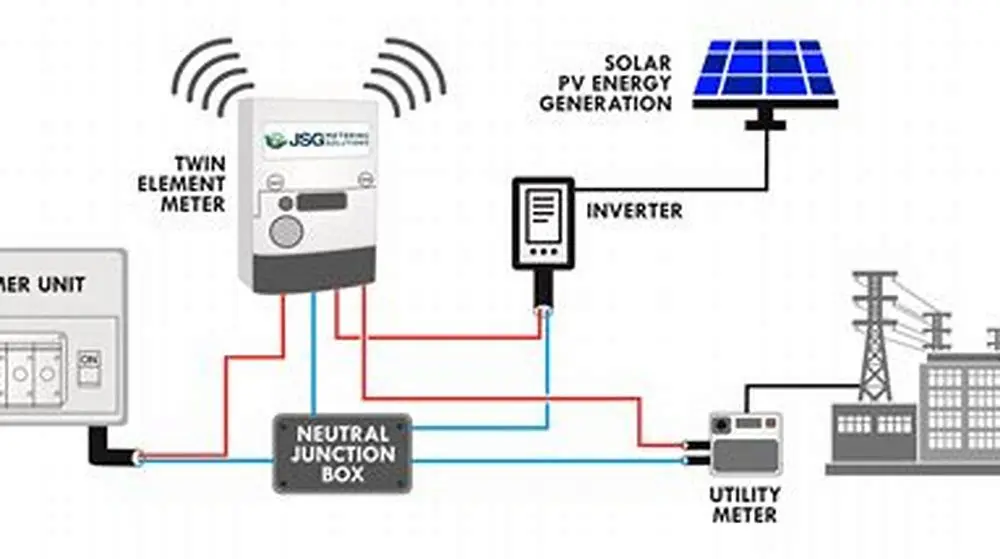
Follow the cable from your panels. DC runs to the inverter, AC leaves the inverter through an AC isolator, then through the generation meter, then to a dedicated MCB in your consumer unit. The meter measures 230V AC energy in kWh under normal household conditions, typically 0-45A on domestic arrays. Longer cable runs add a tiny voltage drop, but the kWh count stays accurate if the meter is wired correctly. We go through smart export guarantee rates compared step by step elsewhere on the site.
You will see a small rectangular box, about 100 mm wide, with a digital screen and a red LED that flashes per 1 Wh or 10 Wh pulse. Press the button to cycle displays. The one you want is cumulative kWh, often labelled TOTAL or IMP. Some show voltage and current too. Note the serial number on the front. Suppliers and FIT licensees match readings to that number.
Homes with batteries or diverters still put the generation meter right after the inverter, before any branch to battery or hot water diverter. That way it counts everything the array made, even if the battery later stores it. If your meter sits after the battery, your totals will be wrong. Check the wiring order and you avoid that trap.
- Inverter: converts DC to 230V AC and shows instant watts.
- Generation meter: logs cumulative kWh after the inverter.
- Consumer unit: distributes solar, grid and battery power to circuits.
Generation meter vs smart meter vs export meter: what each counts
Your generation meter counts all solar made, your smart meter counts what crosses the grid boundary, and an export meter counts only what you send out. A house that makes 10 kWh in a day, uses 6 kWh at home and exports 4 kWh will show 10 on the generation meter, 4 on export, and the smart meter will show import and export separately. Mix those up and you under-claim or misdiagnose a fault. We go through limitations of solar export tracking in dim conditions step by step elsewhere on the site.
Installers and DNO paperwork often list all three. FIT contracts required a dedicated generation meter with a MID mark and a visible serial number. SEG contracts need a smart meter that can record half-hourly export, or a separate export meter. You can have both types on one home. One proves generation, one proves export. Neither replaces the other.
Use the right figure for the right job. FIT payment uses generation kWh plus deemed or metered export. SEG payment uses metered export only. Health checks use generation kWh versus expected yield for your kWp, orientation and season. Compare generation kWh to inverter app totals each month. A gap over 5% deserves a closer look at shading, soiling or a string fault.
| Meter | Where it sits | Counts | Used for |
|---|---|---|---|
| Generation meter | After inverter, before house circuits | All solar kWh made | FIT generation and health checks |
| Smart meter (import/export) | Grid boundary | Import from grid and export to grid | Billing and SEG export |
| Dedicated export meter | Grid boundary or henley block | Export only | METERED export where smart meter cannot |
Check your generation meter reading and keep records
Take a reading the same way every time and you will spot drift early. Read the cumulative kWh to one decimal place, write the date, and photograph the display with the serial number visible. Do this monthly, or quarterly if your FIT licensee asks for quarterly. A south-facing 4 kWp system in central England often makes 3,400 to 4,200 kWh per year, lower in the north or with east-west splits. Your number depends on pitch, shade and weather that year. If that sounds like your situation, read up on solar battery kwh estimate next.
Your inverter app should track close to the meter. Expect the meter to read 1-3% higher or lower than the app due to different sensors and rounding. A sudden flat line for days, or a yield drop over 15% in the same month versus last year, points to a fault, not weather. Note any error codes on the inverter at the same time. That pair of facts speeds up any warranty call.
Keep a tiny log. A notebook or phone note works. Columns for date, meter kWh, difference since last reading, and notes like "inverter tripped" or "snow". Suppliers accept photos, but a log proves patterns. If you move house, leave the log with the new owner and tell your FIT licensee the closing reading on moving day.
- Press the meter button until TOTAL kWh shows, usually to 0.1 kWh.
- Write date, time and the full number, then photo the screen and serial.
- Subtract last reading from this one to get kWh since last check.
- Compare to inverter app total for same period and note any gap over 5%.
- Send the reading to your FIT licensee if due, and file the photo.
Pick the fix when your generation meter stops or looks wrong
A blank screen usually means no supply to the meter, not dead panels. Check the dedicated MCB in the consumer unit and the small fuse or isolator feeding the meter. The display needs 230V to run, so a tripped breaker or loose neutral stops it while the inverter may still run. Switch off, check connections are tight, then restore. If the screen stays dark, the meter itself may have failed. If that sounds like your situation, read up on how AC-coupled batteries fit in next.
A reading that never moves while the inverter shows watts points to wiring order or a failed meter. Generation meters have an arrow for current direction. If fitted backwards, some count nothing or flash an error. Others need a pulse or Modbus wire that has come loose. An electrician can test voltage at the meter terminals and confirm current direction with a clamp. Do not swap it yourself. This is notifiable electrical work.
Stuck or erratic numbers can also follow a power cut or a meter swap. After any swap, record the old closing kWh and the new opening kWh with photos and tell your FIT licensee that day. FIT terms require an approved replacement and a record of the change. For non-FIT homes, replace like-for-like with a MID-approved kWh meter rated to your inverter output, usually 45A is plenty for domestic arrays under 6 kWp.
- independent check on inverter data
- needed for FIT payment proof
- helps spot string or shading faults early
- adds a small wiring point to maintain
- needs correct direction and rating
- extra cost on new installs without FIT
Do you still need a generation meter on new solar installs?
New solar without FIT does not legally require a separate generation meter, but many installers still fit one for fault finding. A MID-approved kWh meter costs far less than a lost year of output you did not notice. If your inverter has reliable monitoring and you check it, you can run without one. If your Wi-Fi drops or the app is patchy, a physical meter keeps truth on the wall. Choose based on how you will actually monitor. If that sounds like your situation, read up on solar and battery payback timeframe next.
For SEG export payments, your smart meter is the billing meter, not the generation meter. Suppliers need half-hourly export data, which a standard generation meter cannot provide. Some older smart meters in the north needed a separate export meter, most new SMETS2 meters handle it. Ask your SEG licensee what they will use to count export before you pay for an extra export meter. Do not buy hardware on guesswork.
Landlords and homes with multiple strings or shading should lean to fitting one. A generation meter gives a single total you can compare to MCS predicted yield on the certificate, usually quoted as kWh per year for your kWp and location. Tenants can send a photo, you can track performance, and you have evidence for an installer if output falls short. That's the practical trade-off: a little extra hardware for clearer accountability.
- FIT homes: keep and maintain the generation meter, readings are contractual.
- SEG-only homes: generation meter optional, useful as independent check.
- Off-grid or battery-heavy homes: meter still helps you audit true solar yield.
Get quotes that compare like for like
Quotes that hide the metering plan hide the aftercare. Ask each installer to state in writing whether a MID-approved generation meter is included, its A rating, where it will sit in the wiring order, and who records readings. Get the MCS certificate predicted yield in kWh per year for your roof, not just kWp. That lets you judge value, not just price. Two quotes with the same kWp can differ by 10-15% on yield due to stringing and shade assumptions. The other half of this decision is bifacial panel energy output.
Check monitoring too. Some inverters include free apps, some charge after year one, some need extra hardware for consumption monitoring. If you want a generation meter plus consumption clamps, say so. Installers can then price the same set of parts and labour. Keep the comparison clean and you will see who is thorough.
Use the reading habit from day one. Log the opening generation meter kWh on commissioning day, then monthly. If the system underperforms versus the MCS estimate by more than 10% over a full year after weather correction, go back to the installer with your log and inverter data. Clear records get faster fixes and protect any FIT or SEG paperwork.
Quick questions
Can I use my smart meter instead of a generation meter?
No. A smart meter records import from the grid and export to the grid at the boundary. It does not record total solar generation. Your generation meter sits after the inverter and counts every kWh made, even the part you use at home.
What number do I send for FIT payments?
Send the cumulative generation kWh from the generation meter, to one decimal place, on the date your licensee asks. Include a photo showing the serial number. Tell them immediately if the meter is changed, with old and new readings.
My generation meter shows less than my inverter app, is that normal?
A small gap of 1-3% is normal due to different sensors and rounding. A gap over 5% that persists points to wiring order, a meter fault or app error. Check that the meter is after the inverter and before any battery branches.
Who can replace a faulty generation meter?
Use a qualified electrician or your solar installer. The work is on the AC side and must be safe and compliant. For FIT homes, fit a MID-approved kWh meter and report the swap and both readings to your licensee the same day.